
Robot Localization Guide: Indoor Pose Estimation with Encoder Odometry
Understand robot localization using encoder odometry in C++. Learn how robots estimate pose indoors with equations, examples, and real world insights.

Share :
Quick answer
Understand robot localization using encoder odometry in C++. Learn how robots estimate pose indoors with equations, examples, and real world insights.
Quick Answer
Understand robot localization using encoder odometry in C++. Learn how robots estimate pose indoors with equations, examples, and real world insights.
Who This Is For
- ROS 2 Learner
- Mobile Robotics Student
- Robotics Career Shifter
What You Will Learn
- What Nav2 means in practical robotics.
- How this topic connects to real robot projects.
- What to learn or build next after this article.
Robots are no longer futuristic machines they are now working in warehouses, hospitals, and even homes. For a robot to function properly, it must know where it is in its environment. This process is called robot localization, and it is the foundation for advanced tasks like navigation, mapping, and motion planning. In this beginner-friendly guide, we'll explore how indoor robot localization works, why robot pose estimation is important, and how you can implement robot localization using encoder odometry in C++. Along the way, you'll see equations, practical examples, and even a chart of robot parameters to help you visualize the process.
What is Robot Localization?
Simply put, robot localization is the ability of a robot to know its position (X, Y) and orientation (theta) inside an environment. Imagine driving a car without GPS you would not know where you are on the road. Similarly, without localization, a robot cannot move intelligently. Localization enables tasks such as:
- Following a path in a factory.
- Avoiding obstacles while navigating.
- Performing SLAM (Simultaneous Localization and Mapping).
- Carrying out delivery missions indoors.
Primary benefit: Without robot localization, higher-level algorithms like motion planning or SLAM cannot work.
Why Indoor Robot Localization is Challenging
Unlike outdoor robots that can use GPS, indoor robots face different challenges, GPS doesn't work indoors, and small errors in wheel rotation accumulate over time. A practical example of these challenges is discussed in ROS Mapping and Localization
- GPS does not work indoors.
- Small errors in wheel rotation accumulate over time.
- Robots need to track their movement in real-time without external signals. That's why odometry using encoders is often the first step for indoor robot localization.
Components Needed for Robot Localization
A typical indoor mobile robot consists of:
- Microcontroller - acts as the brain.
- Motors and motor driver - generate movement.
- Wheels with encoders - measure wheel rotation.
- IMU (Inertial Measurement Unit) - measures tilt and acceleration.
- Battery - powers the system. Encoders play a key role because they measure wheel rotations, which can be converted into distances.
Measuring Your Robot for Localization
Before applying equations, you must measure your robot's physical parameters:
- Wheel base (distance between wheels): 17 cm
- Wheel radius: 3.25 cm
- Encoder ticks per revolution: Left = 370, Right = 380 Here's a simple visualization of these robot parameters: These values are used in localization equations to compute the robot's position.
Odometry Equations for Robot Localization
Encoders provide ticks (rotations). These are converted into distances using:
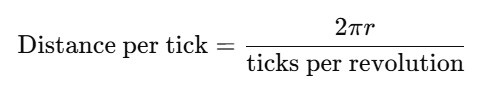 Next, we calculate:
- Distance Center (dCenter):****
- Change in angle (dTheta): !https://robotisim.com/wp-content/uploads/2025/10/image-2.png
Finally, update the pose of the robot:
 This gives the robot's pose estimation in the global frame.
**Implementing Robot Localization Using Encoder Odometry in C++
Here's a simple C++ program for odometry:
This gives the robot's pose estimation in the global frame.
**Implementing Robot Localization Using Encoder Odometry in C++
Here's a simple C++ program for odometry:

#include <iostream>
#include <cmath>
class DifferentialDriveOdometry {
public:
    DifferentialDriveOdometry(double wheelRadius, double wheelBase, int ticksPerRevLeft, int ticksPerRevRight)
        : r(wheelRadius), L(wheelBase), ticksLeft(ticksPerRevLeft), ticksRight(ticksPerRevRight),
          x(0.0), y(0.0), theta(0.0), prevLeft(0), prevRight(0) {}
    void update(int leftCount, int rightCount) {
        int deltaLeft = leftCount - prevLeft;
        int deltaRight = rightCount - prevRight;
        prevLeft = leftCount;
        prevRight = rightCount;
        double distLeft = (2*M_PI*r*deltaLeft) / ticksLeft;
        double distRight = (2*M_PI*r*deltaRight) / ticksRight;
        double dCenter = (distLeft + distRight) / 2.0;
        double dTheta = (distRight - distLeft) / L;
        x += dCenter*cos(theta + dTheta / 2.0);
        y += dCenter*sin(theta + dTheta / 2.0);
        theta += dTheta;
        if (theta > M_PI) theta -= 2*M_PI;
        if (theta < -M_PI) theta += 2*M_PI;
    }
    void pose() {
        std::cout << "X: " << x << " Y: " << y << " Theta: " << theta << std::endl;
    }
private:
    double r, L;
    int ticksLeft, ticksRight;
    double x, y, theta;
    int prevLeft, prevRight;
};
int main() {
    DifferentialDriveOdometry odom(0.0325, 0.17, 370, 380);
    odom.update(100, 100);
    odom.pose();
    odom.update(200, 190);
    odom.pose();
    return 0;
}
This code continuously updates the robot's X, Y, and Theta as encoder values change.
Practical Challenges in Robot Localization
Even if the math is correct, robots face real-world issues:
- Wheel slip: friction causes drift.
- Uneven motors: left and right wheels may not rotate equally.
- Encoder mismatches: even identical encoders may output different tick counts. Because of these issues, odometry alone is not enough. That's why localization is often combined with IMUs, cameras, or LiDAR.
Beyond Encoders: Improving Localization
For advanced applications, robot localization is combined with:
- IMU fusion - for better orientation tracking.
- Vision-based localization - using cameras.
- SLAM algorithms - mapping while localizing. A good starting point is odometry, but for reliable indoor navigation, additional sensors are recommended.
FAQs on Robot Localization
**Q1: What is robot localization?******It is the process of finding a robot's position and orientation in a given environment.**Q2: How does indoor robot localization work without GPS?******It relies on encoders, IMUs, and vision sensors instead of GPS.**Q3: What is robot pose estimation?******It means finding the X, Y coordinates and the orientation (theta) of a robot.**Q4: Why do we use encoder odometry in C++?******C++ is fast, reliable, and widely used in robotics frameworks like ROS.**Q5: Can robot localization be done with only odometry?******Yes, but errors accumulate. That's why IMU or vision-based systems are usually added.
Conclusion
Robot localization is the foundation of indoor mobile robotics. By using encoders, odometry equations, and simple C++ programs, we can estimate a robot's pose (X, Y, Theta). While odometry provides a great starting point, real-world challenges like drift and wheel slip require sensor fusion with IMUs or cameras. If you're building your first robot, start with encoder-based odometry, implement it in C++, and test it by moving forward and backward. Once you see the math come alive, you'll realize how essential localization is for advanced robotics applications like navigation, motion planning, and SLAM. See the full TASK LIST
Practical Example
A practical way to use this article is to connect the concept to a small robot workflow: identify the input, the processing step, and the output you expect from the robot. If the article involves ROS 2, test the idea in a small workspace or simulation before applying it to a larger robot project.
Common Mistakes
- Trying to memorize the term without connecting it to a robot behavior.
- Skipping the prerequisite concepts that make the workflow easier to debug.
- Copying commands or code without checking what each node, topic, file, or parameter is responsible for.
- Treating one tutorial as a complete roadmap instead of linking it to the next concept.
How This Connects to Other Topics
- How to Add Custom Libraries to a ROS 2 C++ Package
- Robot Starter Kit Guide: Choose the Right Beginner Robot Parts
- ROS 2 SLAM Beginner Guide: Help Your Robot Draw Its First Floorplan
- From STL to Autonomy: Building an Indoor Self-Driving Robot
- ROS 2 Dataset Guide: Foxglove, RViz, and TurtleBot3 SLAM
Learn Next
- How to Add Custom Libraries to a ROS 2 C++ Package
- Robot Starter Kit Guide: Choose the Right Beginner Robot Parts
- ROS 2 SLAM Beginner Guide: Help Your Robot Draw Its First Floorplan
- From STL to Autonomy: Building an Indoor Self-Driving Robot
- ROS 2 Dataset Guide: Foxglove, RViz, and TurtleBot3 SLAM
- Mobile Robotics Engineer Path
FAQ
Is Robot Localization Guide: Indoor Pose Estimation with Encoder Odometry suitable for beginners?
Yes. The article is written to make the concept easier to understand, while still connecting it to practical robotics work.
What should I learn before this topic?
Start with the prerequisite ideas listed in the article, then connect them to a small project or simulation so the concept becomes concrete.
How does this topic connect to real robots?
It helps you understand how software, sensors, control, simulation, or career decisions show up in practical robot development.
What should I do after reading this article?
Pick one related concept from the Learn Next section and build a small example that uses it.
Can I learn this through Robotisim?
Yes. Robotisim connects these concepts to structured learning paths and project-based robotics practice.
Final Summary
Robot Localization Guide: Indoor Pose Estimation with Encoder Odometry is part of the broader Nav2 and Autonomous Navigation learning path. The key is to understand the concept, connect it to a real robot workflow, and then practice it through a focused project instead of learning it in isolation.
This article supports Mobile Robotics Engineer Path, especially Nav2.
Learn with Robotisim
Build a complete Nav2 robot inside Robotisim.
Explore the academyLearn next

How to Add Custom Libraries to a ROS 2 C++ Package
Learn to add custom libraries to your ROS 2 C++ packages. Enhance your robotics projects with reusable code and streamline your development process!
Read more
Robot Starter Kit Guide: Choose the Right Beginner Robot Parts
Avoid overspending on the wrong parts. This guide walks you through building your first robot with a smart, affordable robot starter kit and key upgrade paths.
Read more
ROS 2 SLAM Beginner Guide: Help Your Robot Draw Its First Floorplan
Learn how to set up ROS 2 SLAM and map your robot's environment. A beginner friendly guide to launching SLAM with LiDAR, odometry, and ROS 2 navigation stack.
Read more
From STL to Autonomy: Building an Indoor Self-Driving Robot
Learn how to build a ROS 2 autonomous robot from 3D printed STL parts to indoor navigation. A complete DIY guide for robotics and ROS 2 beginners.
Read more